Houdini Solaris Sink
TOC
- Attribute conversion
- Scene graph
- Primitive matching patterns
- Assigning materials with VEX
- Getting stage values
- Multishot workflow
- Links
Attribute conversion
v@P      >>> points
v@Cd     >>> primvars:displayColor
f@Alpha  >>> primvars:displayOpacity
i@id     >>> ids
v@uv     >>> primvars:st // think of STMaps in Nuke
v@N      >>> normals
v@v      >>> velocities
v@w      >>> angularVelocities
v@accel  >>> accelerations
f@width,
f@widths,
f@pscale >>> widths
Scene graph
Detail text colors
The values are color-coded as in Pixar’s usdview utility.
| Grey | Not set | Value is not set. |
| Orange | Fallback | Default values provided by the schema where no value was explicitly set. |
| Blue | Set | Attribute/primvar value (without time samples). |
| Green | Time sampled | Animated value (read from time samples). |
| Violet | Value clip | Time sampled value from a value clip. |
| Indigo | Computed | Read-only intrinsic or computed values. |
| Red | Relationships | Pointer to another prim with some relationship to the selected prim(s). |
Primitive matching patterns
- Using AND logic
Match subsets of BasisCurves
%type(BasisCurves,strict=true) & %type(GeomSubset,strict=true)
/Kitchen/* & %Props & %Static
- OR logic
/house/* + /yard/* + /garage/*
- NOT logic
/Kitchen/* - %Lights
/Kitchen/*Chair ^ /Kitchen/HighChair
Assigning materials with VEX
Using partitions
This is the case when you have materials already assigned in SOPs. It solves 2 problems at once. First, getting rid of the unindexed shop_materialpath attribute, it saves memory and is more robust. And secondly, it automatically reconstructs the new LOP material primitive path from the subset primitive names (which have the material paths in them).
- Import/create SOP geometry, and set
shop_materialpathas partition attribute.
DisablePrefix Subsets with Attribute Namefor shorter names.
This will create GeomSubset primitives under each of your Mesh primitives, and their names will contain the path to each material (with slashes replaced with underscores). We'll use these names to get our materials re-assigned in LOPs. - If it is a few objects, you might want to create a separate
Material Librarywith unique path to each geo's material set. - Use
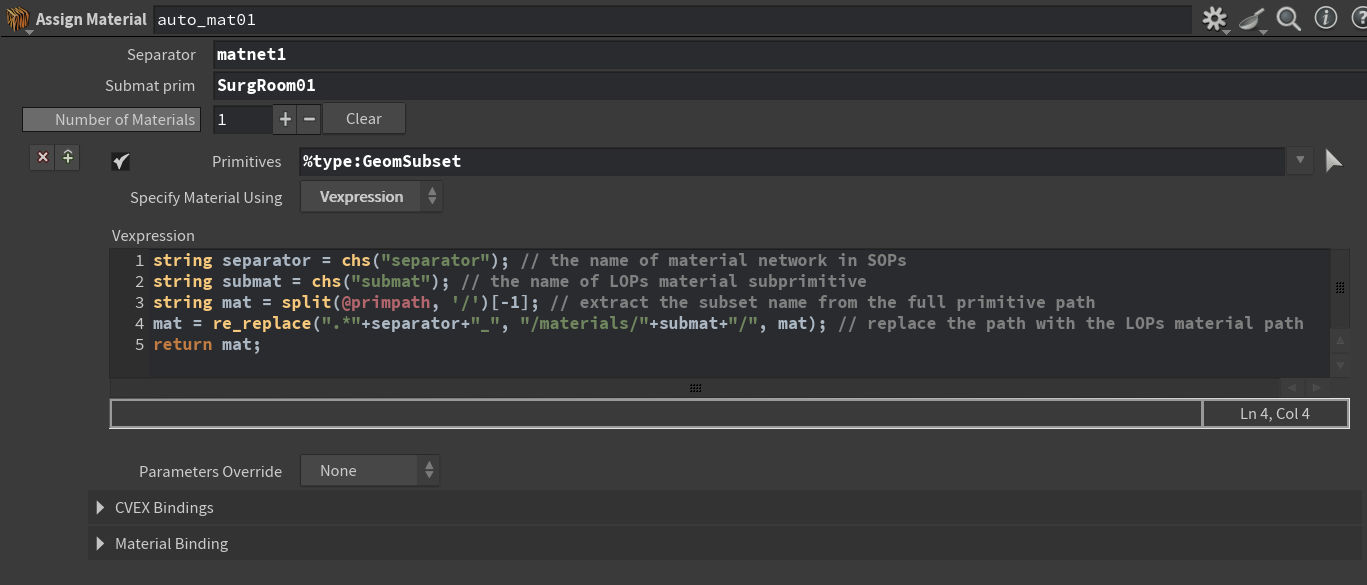
Assign Materialnode with Vexpression.
To iterate through the GeomSubset primitives set Primitives field to:
%type:GeomSubset
Use vexpression:
string separator = chs("separator"); // the name of material network in SOPs
string submat = chs("submat"); // the name of LOPs material subprimitive
string mat = split(@primpath, '/')[-1]; // extract the subset name from the full primitive path
mat = re_replace(".*" + separator + "_", "/materials/" + submat + "/", mat); // replace the path with the LOPs material path
return mat;
- Add 2 string field to the node interface for
separatorandsubmatvalues. Or hard-code them instead.
Getting stage values
Python expression to get the Stage's start/end frames. This call re-cooks the tree.
stage = hou.pwd().inputs()[0].stage() # reads stage from the input
return stage.GetStartTimeCode()
# or
return stage.GetEndTimeCode()
LOPs python examples from docs