Houdini VEX sink
· Houdini MOC · Houdini VEX · Houdini VEX reference ·
TOC
- Houdini VEX sink
Data types
| Type | Character | Description |
|---|---|---|
| int | i@ | Integer values (also bool) |
| float | f@ | Floating point scalar values |
| vector2 | u@ | Two floating point values |
| vector | v@ | Three floating point values |
| vector4 | p@ | Four floating point values |
| array | []@ | A list of values |
| struct | - | A fixed set of named values (class) |
| matrix2 | 2@ | { {1,0}, {0,1} } |
| matrix3 | 3@ | { {1,0,0}, {0,1,0}, {0,0,1} } |
| matrix | 4@ | { {1,0,0,0}, {0,1,0,0}, {0,0,1,0}, {0,0,0,1} } |
| string | s@ | A string of characters |
| dict | d@ | A dictionary mapping strings to other VEX data types |
| bsdf | - | A bidirectional scattering distribution function |
Specifying VEX data types
The following characters are used to cast to the corresponding data type.
float       f@name    // Floating point scalar values.
vector2     u@name    // Two floating point values. Could be used to store 2D positions.
vector3     v@name    // Three floating point values. Usually positions, directions, normals, UVW or colors.
vector4     p@name    // Four floating point values. Usually rotation quaternions, or color and alpha (RGBA).
int         i@name    // Integer values (VEX uses 32 bit integers).
matrix2     2@name    // Four floating point values representing a 2D rotation matrix.
matrix3     3@name    // Nine floating point values representing a 3D rotation matrix or 2D transform matrix.
matrix      4@name    // Sixteen floating point values representing a 3D transform matrix.
string      s@name    // A string of characters.
Type casting
int a, b;
float c;
c = (float)a / (float)b; // float(a) is unnecessary
// type cast a function
float n;
n = noise(noise(P));
n = noise(vector(noise(P)));
Operator type interactions
1/100 results in integer, 1/100.0 results in float.
See #Operator type interactions
float * int = float
int * float = int

vector * scalar = vector

v2 * v4 = v4
**Important!!!**
The “missing” component(s) on the smaller vector are filled in as {0.0, 0.0, 0.0, 1.0}
Strings
Supports all standard string operations/functions and some array functions
RegEx
By default RegEx matching is case-sensitive.
To make matching case-insensitive use (?i) modifier at the start of the regex pattern.
Functionality of the VEX functions is different for different datatypes of the result (defined by type casting).
string pat = r"(?gi)one|two|three";
string found_word = re_find(pat, "three is one plus two");  // returns 'three'
int found = re_find(pat, "three is one plus two");          // returns 1 (true)
Vectors
@v = {1, 1, 1};
v@v = set(x, y, z);
Arrays
Slicing
int numbers[] = array(1,2,3,4);
numbers = numbers[::-1];         // reverse
i@secondLastItem = numbers[-2];  // second item from end
i[]@firstHalf = numbers[:2];     // first 3 items
i[]@secondHalf = numbers[2:];    // items from index 2 to the end
i@returnedPopVal = pop(numbers); // removes the last element and returns it
push(numbers, i@returnedPopVal); // appends element to the array
Flattening
// flattening an array of vectors and reverting it
vector vectors[] = { {1,2,3}, {4,5,6}, {7,8,9} };
f[]@serializedVectors = serialize(vectors);
v[]@unserializedFloats = unserialize(f[]@serializedVectors);
Dictionaries
reading motion clip clipinfo (detail attribute) range value
dict clipinfo = detail("op:../motionclip", "clipinfo");
printf("clipinfo=%d", clipinfo); // this will help find the datatypes inside the dictionary

vector2 crange = getcomp(clipinfo, "range"); // get the value of "range" key
printf("range=%d", crange); // just checking the value

adddetailattrib(0, "clip_range_end", crange[1]); //set the value to current geo detail
Operators
Dot operator
// vector
v = set(v.x, v.y, v.z);
v = set(v.r, v.g, v.b);

// vector2
v2 = set(v2.x, v2.y);
v2 = set(v2.u, v2.v);

// vector4 forth element
f = v4.a;
f = v4.w;

// matricies
m[0][0] = m.xx;
m[2][2] = m.zz;
m[3][0] = m.ax;

//components and swizzling
v.zyx   = set(v.z,  v.y,  v.x);
v4.bgab = set(v4.b, v4.g, v4.a, v4.b);
Comparisons
The logical (&&, ||, and !) and bitwise (& |, ^, and ~) operators are only defined for integers
All bool operations are casted to integers!
Pragmas
#pragma opname   noise_surf
#pragma oplabel  "Noisy Surface"

#pragma label    clr          "Color"
#pragma label    frequency    "Frequency"

#pragma hint     clr          color
#pragma range    frequency    0.1 10

surface noise_surf(vector clr = {1,1,1}; float frequency = 1; export vector nml = {0,0,0})
{
    Cf = clr * (float(noise(frequency * P)) + 0.5) * diffuse(normalize(N));
    nml = normalize(N)*0.5 + 0.5;
}
Channel shortcut syntax
This is used to hint at the data type of auto generated wrangle parameters.
ch('flt1');             // Float
chf('flt2');            // Float
chi('int');             // Integer
chv('vecparm');         // Vector 3
chp('quat');            // Vector 4 / Quaternion
ch3('m3');              // 3x3 Matrix
ch4('m4');              // 4x4 Matrix
chs('str');             // String
chramp('r', x);         // Spline Ramp
vector(chramp('c', x)); // RGB Ramp
Remapping attribs
parm *= rand(@id+38+ch("seed"));

//random number, linear spread
parm = fit01(rand(@id+31+ch("seed")),ch("min"),ch("max"));

//particle age -> Ease in - Ease out
parm *= smooth(ch("start"), ch("end"),@nage);

//parameter change in a certain time range
parm = fit(@Frame, ch("start"), ch("end"), ch("start_value"), ch("end_value"));

//connect params
parm = fit(@P.y, ch("low"), ch("high"), ch("low_value"), ch("high_value"));

//param from age by multiplier
parm *= chramp("parm",@nage);

//param from a particle speed
parm = fit(length(@v),ch("speedmin"),ch("speedmax"), ch("valuemin"), ch("valuemax"));
Sampling functions
Random Directed Vectors
Source
Sample Direction Uniform
Sample Direction Uniform
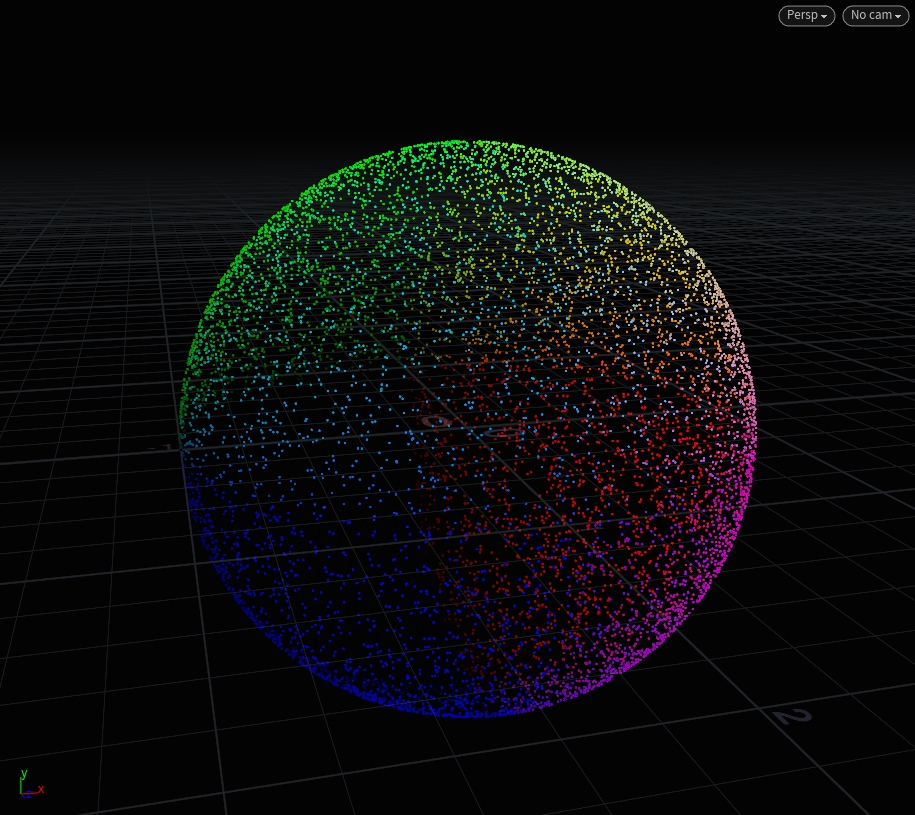
This is a great way of getting “random” vectors but you need the vectors to be “clamped” to a certain range of “spread”.
To illustrate this, we’ll use a buncha points on a grid and “shoot” (aka move) them out “randomly” using sample functions.
vector2 u = rand(@ptnum);
@P = sample_direction_uniform(u);
Sample Hemisphere
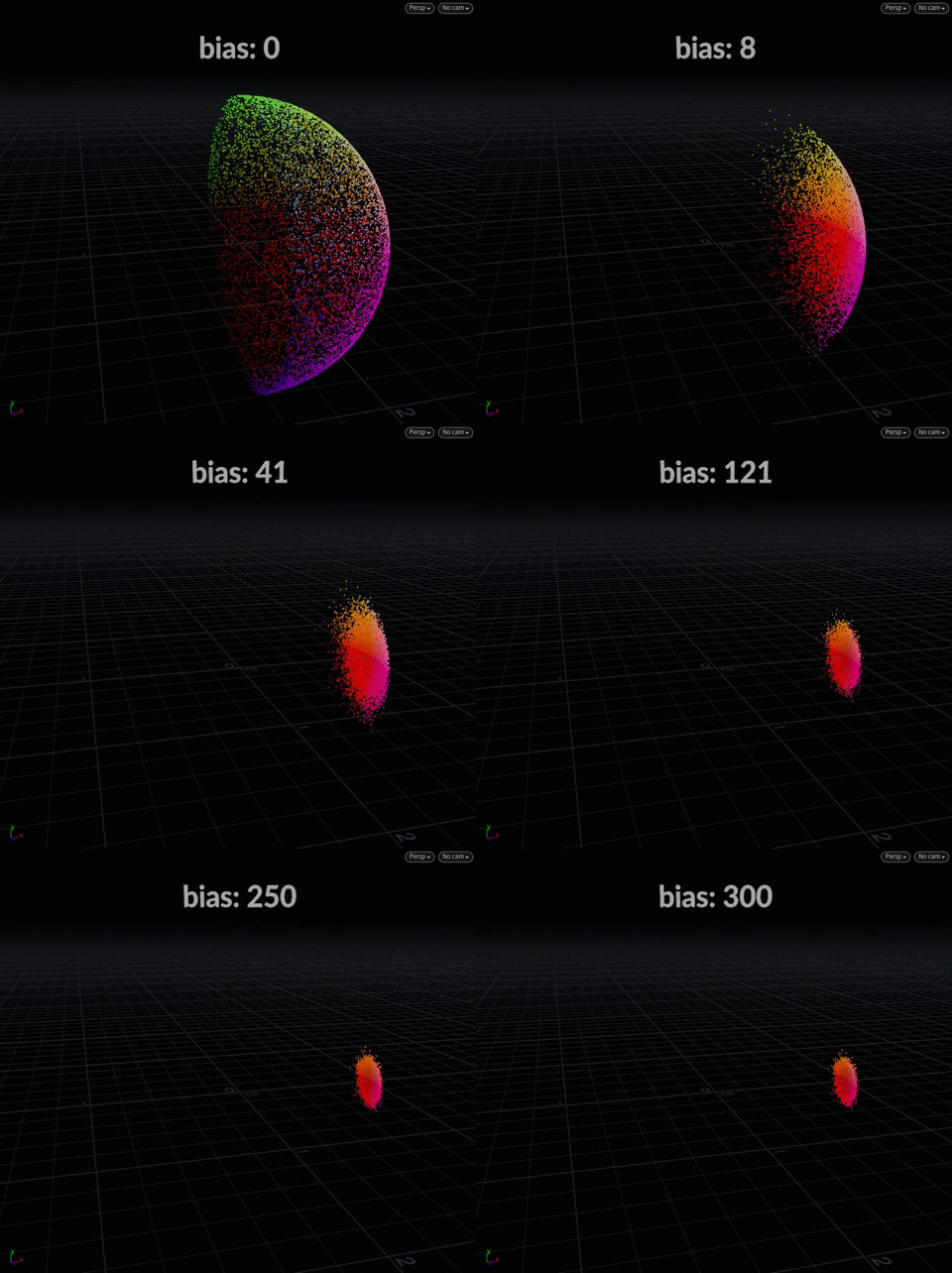
This function takes a center and a bias. Think of “center” in sample functions as “direction” – so {0, 1, 0} is up, {0, -1, 0} is down – and bias is simply the “angle of spread”.
vector2 uv = rand(@ptnum);
float bias = @Frame;
@P = sample_hemisphere({0, 0, 0}, bias, uv);
Sample Direction Cone
This is probably the most useful, instead of bias we just use angle instead to achieve something similar. This time, we’ll scatter upwards using {0, 1, 0} as the center.
vector2 uv = rand(@ptnum);
float angle = 90; // the "spread" of the cone @P = sample_direction_cone({0, 1, 0}, radians(angle), uv);
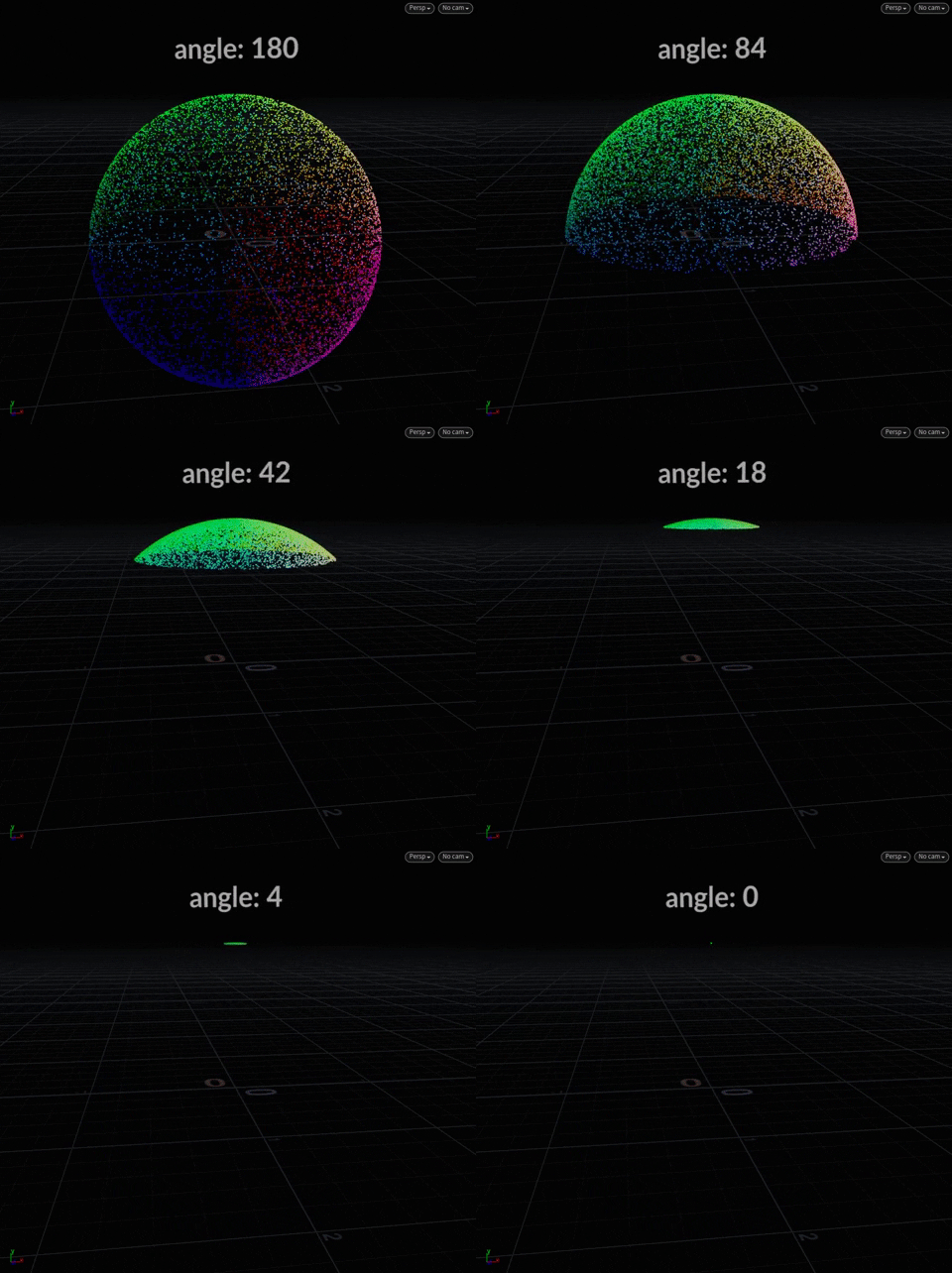
We could imagine using this to shoot out random particles, so instead of @P we could assign it to @v as initial velocity to a DOP – while constraining how far they spread.
But what happens if we want the magnitudes to be the same? Right now, we have some vectors that are ahead of others because it’s a dome-like spread.
We achieve this by only varying v in the uv.
vector2 uv = set(1, rand(@ptnum));
@P = sample_direction_cone({1,0,0}, radians(angle), uv);
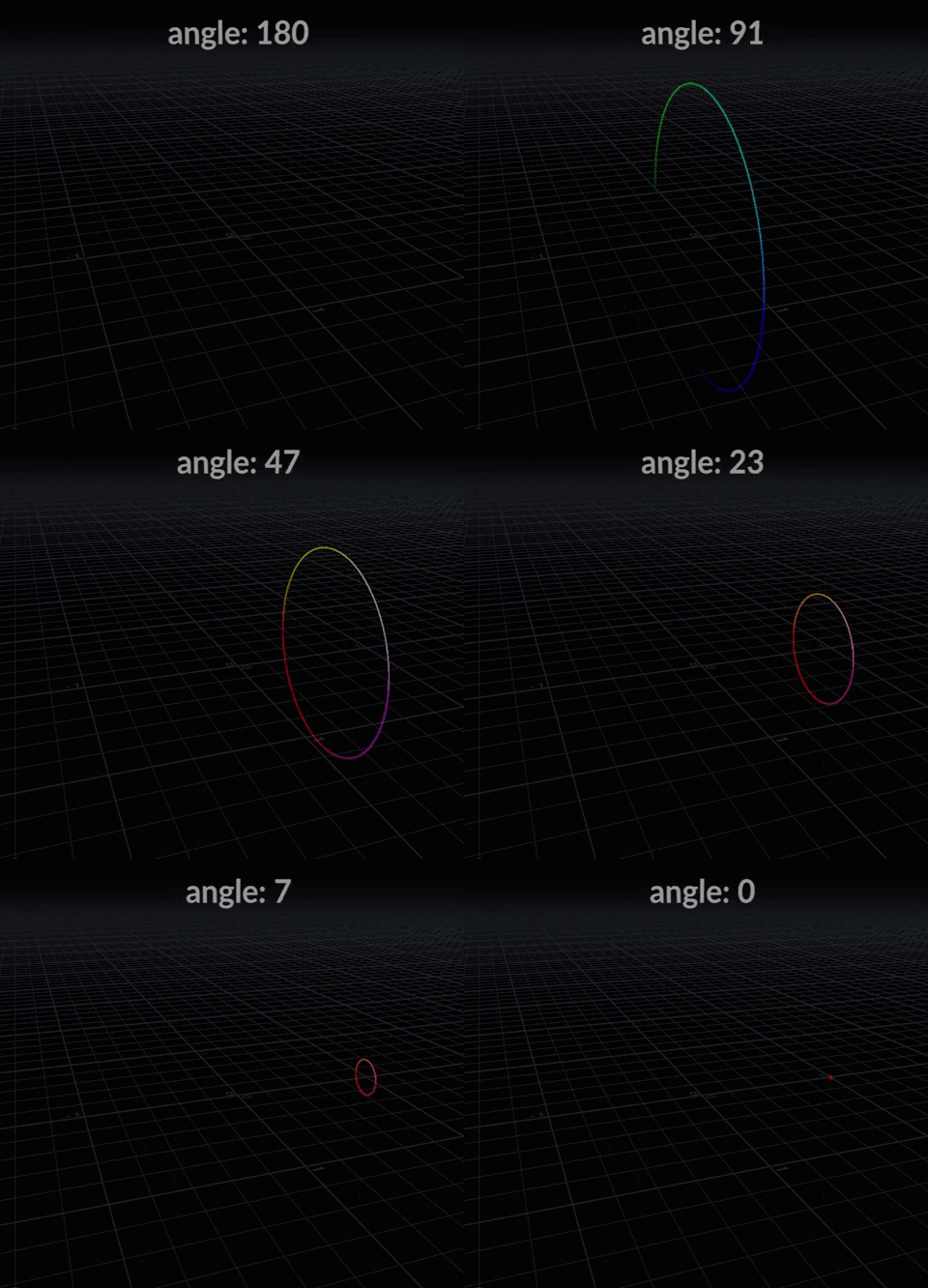
Now the values are “clamped” along whichever axis the center is on e.g. all the points have the same @P.x value – since we are scattering in {1, 0, 0}.
Another way of thinking about this, if we have particles getting shot out in +x direction, they can only vary/wiggle up-down (y) or left-right (z) but how far they go (x) is always the same across all points.
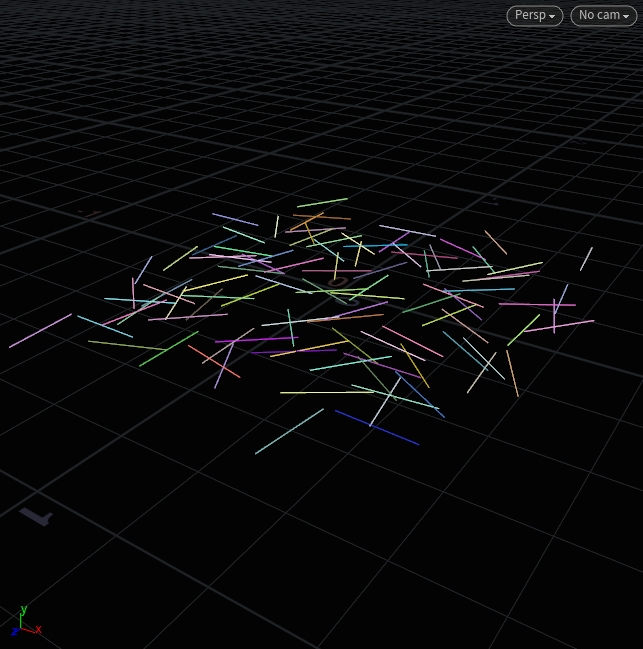
At radians(90) the vectors are perpendicular to the projection plane. We can use this to randomly scatter lines that are perfectly flat on the ground but point in different directions:
// Before a Copy to Points SOP
@N = sample_direction_cone({0, 1, 0}, radians(90), set(1, rand(@ptnum)));
Sample Hypersphere Uniform
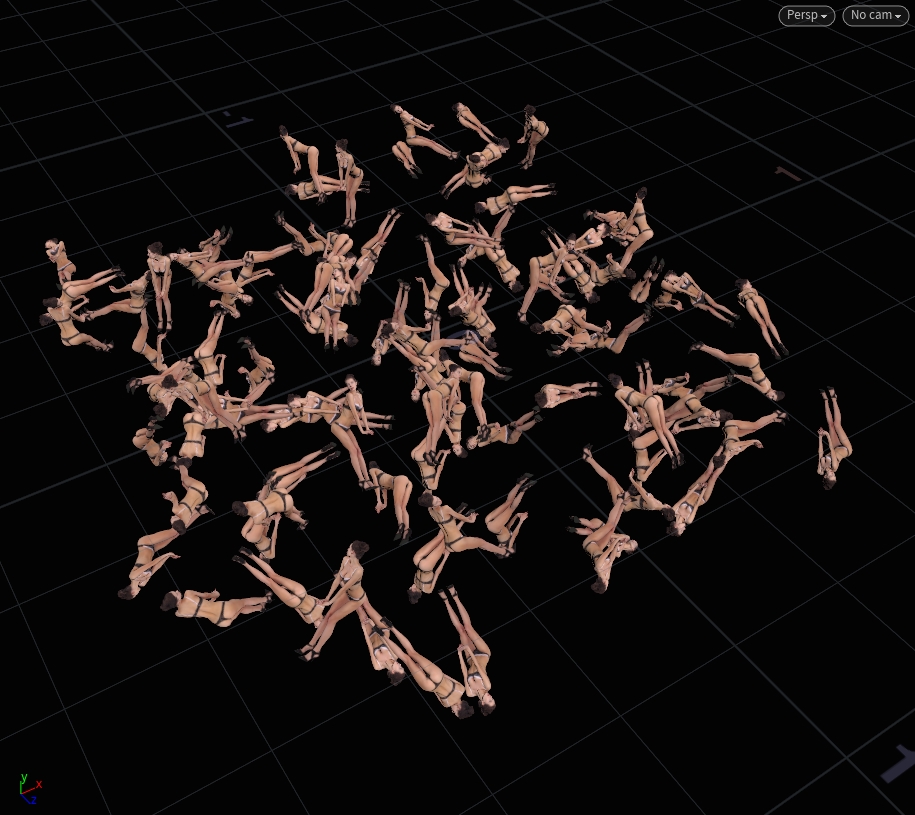
This is a quick way to randomly rotate a bunch of girls around in a Copy to Points e.g. get a random @orient.
@orient = sample_hypersphere_uniform(rand(@ptnum));
Transform functions
Orientation
// orient your points towards your velocity vector:
@orient = dihedral({0,0,1} ,@v);
Calculate the orient attribute from normals:
matrix3 m = dihedral({0,1,1},@N);
@orient = quaternion(m);
Calculate the heading and up vectors from the orient attribute:
matrix3 rr = qconvert(@orient);
v@up = set(rr.yx,rr.yy,rr.yz);
v@heading = set(rr.zx,rr.zy,rr.zz);
Getting transformation from OBJs
// VEX is well integrated into Houdini, it can for example fetch
// world space transformation matrix from an OBJ node, let it be a null OBJ
// or part from a rig, camera or whatever object there which has a transformation
// optransform() will contain also all parent transformations

string nodePath = chs("node_path"); // parameter is a string, but I went into "Edit Parameter Interface" and specified it to be a Node Path
matrix xform = optransform(nodePath);

v@P *= invert(xform);
Links
- The Joy Of VEX
- Pragmatic VEX
Pragmatic VEX series is aimed to increase the technical capacity of the artists and TDs which will allow them to tackle more complex production shots with complete control and ease by acquiring a deeper technical understanding of how things work in Houdini at the lowest level with a strong applied focus on high-end feature film visual effects production. - Get vexed blog
- A collection of code snippets and examples showing syntax and capabilities of VEX
- vfxbrain VEX posts